My HexOS NAS is in a sorry state, having been stuffed behind the sofa and mostly switched off for the last 3 months. My long yearned for private home server has been thoroughly sidelined while my kids, work and a thrilling romance took center stage.
HexOS is designed to empower average nerds like me who don’t have the time or inclination to become TrueNAS specialists. So, can my HexOS NAS survive being totally neglected while I go touch grass? Will getting it up and running again be simple and user friendly? Let’s find out!!
Table of Contents
Why did my NAS get abandoned for 3 months
Google Photos fail
The last thing I was working on was downloading my Google Photos archive and uploading everything to my HexOS NAS. While I was initially really positive and excited about this, it just wasn’t working out.
The downloading was so slow and Google only leaves the archive up for 3 days which, with my kids needing so much of me, was just not enough time for me to download everything. I kept having to start over.
Immich update fails
Additionally, I had been unable to update Immich. The update failed at 20% without any clear error. I reported this on a thread in the forums.
It was especially frustrating because the Immich version on the NAS did not play nicely with the andoid app version I had, and that was primarily how I was using Immich. So I wasn’t really able to functionally use Immich – and this was the main thing I was using the server for.

Boyfriend interrupted
I also enjoyed 3 glorious months of having a boyfriend. The boyfriend was briefly more interesting than the annoying server issues. Alas, my truest love of troubleshooting Linux has won out (because troubleshooting the boyfriend was beyond me).
In all seriousness, we can’t do all the things all the time. Sometimes it’s important to give real life a chance… before running back to the goblin layer to play with our tech. I am getting so wise.
Power interrupted
Finally, I had already replaced the power supply in my NAS because it kept switching off. After this I continued to have issues. Rather than switching off right away, however, the NAS booted and ran fine… but was unreachable whenever I actually needed it. So, for example, I would want to look for a photo on Immich and the server would just be unreachable.
I was worried there was something complicated going on, but I eventually concluded that it was the kids leaning down the back of the sofa and poking the power switch. I concluded this because… I caught my 2 year old leaning down the back of the sofa poking the power switch!
I tried blocking access to the button but the problem carried on, possibly it was the shared power bar getting knocked about.
I had known I needed shelving to wall mount the NAS but had some fatigue and no budget, so in the end I stuffed it on top of my granddad’s old bureau.

This was definitely unsafe, the server is wider than the bureau! If my neighbor farted too hard it would fall down and kill the cat!
However, after a few days of checking I found now that the server was always on. So whatever the issue had been, it was resolved by the NAS not being on the floor stuffed behind the sofa… so I decided to put up some shelves with money from savings.
Tada!

Yes they are perfectly level…

Yes, I can also bake cakes…

It’s almost as if the boyfriend might have been intimidated by my independence or perhaps he just thinks he was foolish to have forgotten his core beliefs having entered into a more “hedged” kind of relationship….
Am I off track? Am I?? No!! He backs up his photos onto an EXTERNAL HARD DRIVE. I’m perfectly on track as always. Back to my NAS.
Current state of NAS
Having stabilized the hardware situation and found that the NAS is running fine, I have a lot of updates to do.
I am on version v0.8.251106. I couldn’t find what the latest version was, I tried looking on the website for example under download or docs, so I’m not sure how far behind I am.
I’m also not sure how I need to approach updating, I don’t know if HexOS will guide me through multiple updates or if I need to do them in order, or if it matters really what I do. Honestly I’m not sure what to expect! Let’s see.
Updating HexOS through multiple versions
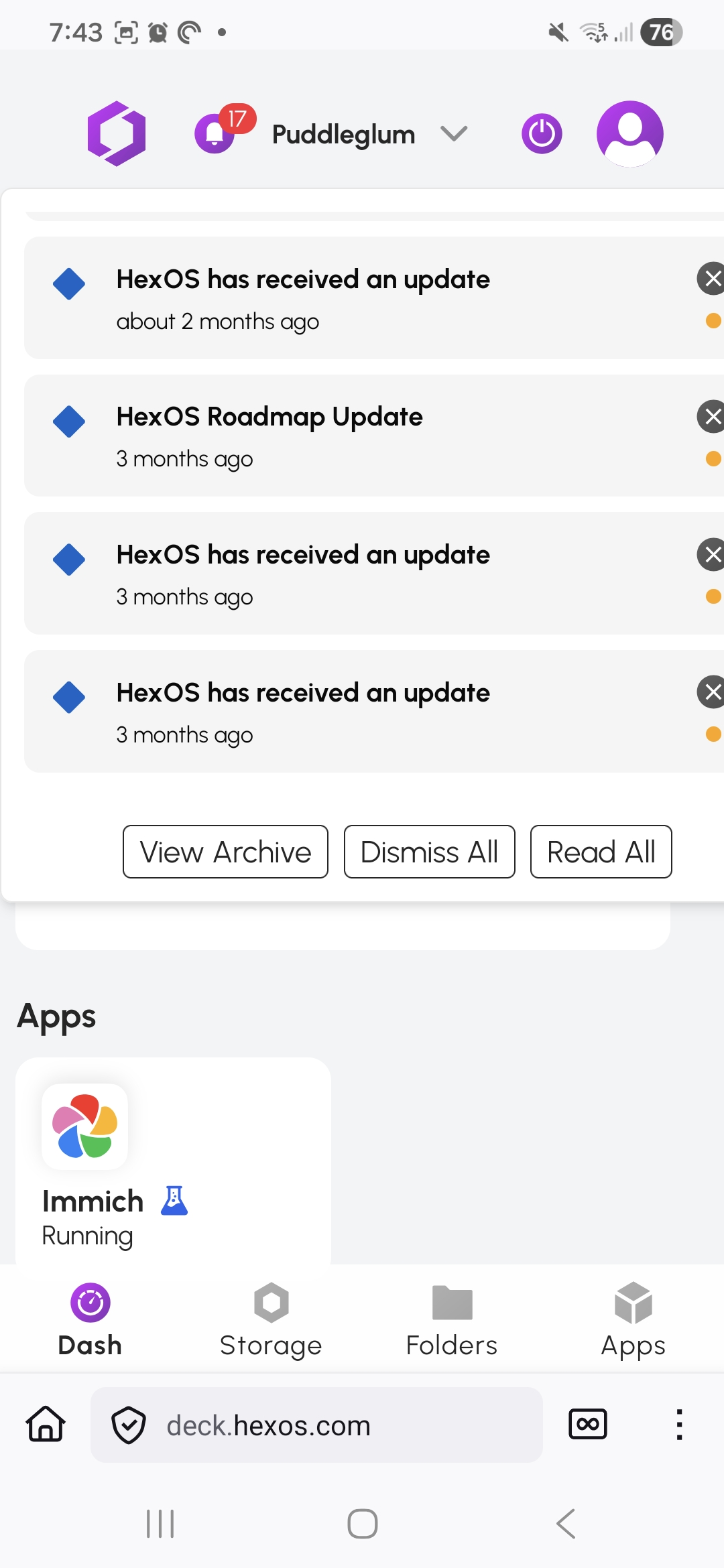
First, I looked for where the updates should be triggered from, I had assumed the settings page but I couldn’t see anything there. So I decided to click on the newest notification first.
My gut tells me to click the oldest, as bearing in mind this was a beta, maybe trying to update across several versions might cause issues. But lets have a go and see!
First I used the notifications dialogue at the top to view the archive of messages. It somehow felt reassuring to be on a full page with more room for detail and not a little drop down message tray.

I found actually HexOS is presenting these update messages out of date order – so I decided to click the top one as that seems indicated. That shows me the following detail to the right.

But clicking release notes shows me this is a TrueNAS release – not a HexOS release. Updating TrueNAS separately to HexOS hadn’t occurred to me and makes me feel quite anxious, surely there is a correct order to do this in?! I’m getting wUpdating TrueNASobbly enough to consider looking at the docs, but I wrote a lot of them and I don’t think I covered this lol.
Updating TrueNAS
I’m going to stick with the subtle prompt to run that TrueNAS update first even though that notification was older than the HexOS updates (it seems TrueNAS updates have an Orange ! and HexOS updates have a blue diamond in the notifications)
Here we go:


Eventually, it came back up. Not sure how long it took because I was eating. There wasn’t any fanfare, nothing to say it had updated except a new notification

As the old notification had been dismissed and the new one replaced it, the notification count stayed the same, which confused me at first

There was no extra info given.

Updating HexOS
I’ll stick with trying the top most update prompt first, this time daring to tap just the notification in the drop down rather than go to the snugly archive page.


Huh….

So there is … like…. nothing to do?! I don’t need to update? It’s already done!
To me, “HexOS has received an update” felt like I needed to run the update, but it seems it’s already been done for me.
Well I’m a little bit embarrassed to have not understood that. I think perhaps “HexOS has been updated” would be clearer. I am aware this might all be beta stuff though, as the local only version is incoming soon. Perhaps the updates are not even being done on my machine.
One last update
I got a really nice clear prompt while I was trying to update HexOS unnecessarily though. I love that it’s labeled quite specifically as to what is being updated. I wish the boyfriend had come with this level of information, frankly.


The information box even explains the timing of the update, it’s happening now because I just ran the TrueNAS update. I so much enjoyed how clear this was and would love it if the other updates were this clear too.

This next prompt is still a bit anxiety making… no, I am not really sure… I don’t really understand the possible consequences. But lets do it anyway!

The update was so quick it was done before I took a screenshot!
So how easy was HexOS to Resurrect?
Really easy! Confusingly so.
I had been putting off playing with my server again because I though it needed a bunch of updates doing. I had even decided to do this tinkering session via my desktop and only when the kids were in childcare because I though it was going to be really annoying. For example I thought it would be like the multiple updates to my smart watch I ran recently, as it had been switched off in a drawer since the summer. It was nothing like that, I did almost nothing and everything is fine.
Kudos to HexOS!
Really enjoyed the boyfriend troubleshooting comparisons throughout. 🙂
Why thank you 😁